Context
I recently came across a mid-sized frontend application written in Angular 6 (yes, which reached EOL back in 2019).
The task was to upgrade the project to an LTS (Long Term Support) version of Angular. As a first move, I chose to upgrade to the first available LTS version, 16.2.X. However, I'm not a frontend specialist, nor deeply familiar with the Node.js stack, and I'd need a lot of time or the support of another developer with more knowledge of the framework.
The project had 40 modules and 175 components, broken down as shown in the table below:
===============================================================================
 Language            Files        Lines         Code     Comments       Blanks
===============================================================================
 CSS                     6          334          271           20           43
 HTML                  180        11903        10206          693         1004
 JavaScript              4           78           49           19           10
 JSON                    2           22           22            0            0
 Sass                  247        12575         9431         1284         1860
 SVG                     2            4            4            0            0
 TypeScript            370        36123        27318         2904         5901
===============================================================================
 Total                 811        61039        47301         4920         8818
===============================================================================
Getting support from another developer wasn't an option, and I also couldn't spend weeks on the migration project. So I decided to try an approach I'd recently seen on some YouTube channels: experimenting with an AI Code Assist tool in the IDE. Although I normally use JetBrains IDEA and GitHub Copilot for backend projects, in this case I wanted to try something new, more focused on my goal: leaning on it to make up for my elementary frontend and Angular knowledge, working in a Driver and Navigator style of pair programming [1], alternating between moments where the AI generated code and I reviewed it, and vice versa.
Tools
For this task, I chose to try out the Cursor [2] code editor, which has native AI integration and promises a productivity boost through a number of features. Below, I highlight the ones I used, though there are other advanced ones described in the documentation [3].
Tab: to suggest or edit code based on an existing snippet or a description;Cursor Prediction: after an edit made withTab, Cursor predicts additional snippets that could be fixed the same way and automatically jumps to the next one with anothertab ⇥;
Chat: to interact with the AI and understand a piece of code or ask for an implementation suggestion;AI Fix in Chat: where an error caught by thelinteris highlighted, and the AI opens a popup suggesting a fix;Apply: to apply the AI's suggestions directly in the editor;
To use Cursor, a premium subscription is not required, although usage is limited [4]. In my case, I chose the Pro subscription to guarantee unlimited use of the
completionsandinstant applyfeatures.
With Cursor, node version 20.11, and the desired version of the Angular CLI installed, I got to work.
Interacting with Cursor's AI
The first thing I did was generate a new project with version 16 of the Angular CLI and compare the differences between the old project and the new one. I noticed that some files were no longer needed, like angular-cli.json, while others needed to be created or adjusted, like angular.json, tsconfig.json, tslint.json, and tsconfig.app.json. I delegated the task of fixing these files to the AI through prompts in the following format:
Update the angular-cli.json file (in context) for Angular version 16.
With the following result:
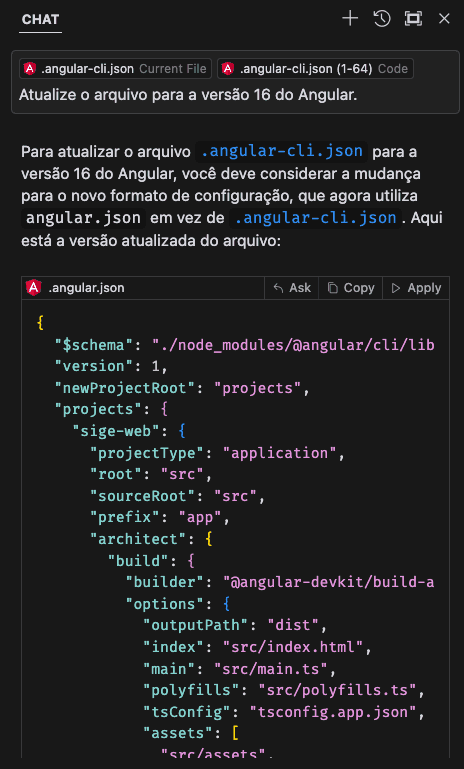
And the changes suggested by the AI were applied directly to the target file:

Once the project's base files were updated, I moved on to the dependencies. Naturally, many no longer existed, or had been renamed. So I had to manually fix a few dependencies based on searches on npm.js — for example, angular-http, which was folded into angular-common, or angular2-fontawesome, which was discontinued and replaced by @fortawesome/angular-fontawesome.
Once the dependencies were updated, and after many npm install runs, it was time to try running ng build and face the first errors.
Backend build phase
Angular projects are split into two major parts: the backend, made up of components, modules, and services; and the frontend, made up of templates, directives, pipes, and UI modules.
In five years, a lot changes, and when it comes to frontend projects, the changes were even bigger.
My approach was to run ng build to compile the backend first, and, as expected, plenty of build errors came up, especially due to the strict setting in tsconfig.json, which now required every variable to be typed. While I could have disabled that setting, I preferred to fix the typing errors in each file with the AI's help, using the features listed at the start of this article. On top of that, many dependencies had their namespaces changed, one of the main examples being the splitting up of Angular Material components, which used to live under the @angular/material namespace.
Hundreds of Tabs later, ng build finally compiled without errors, and I could move on to the frontend build phase.
Frontend build phase
Now ng serve needed to compile the frontend. Naturally, many directives had changed, like property and event binding, which needed fixing.
Here's the explanation Cursor's AI gave for an error during the event binding migration:
The change you mentioned in the Angular directive from maxlength='100' to [maxLength]='100' reflects an update in how properties are bound in Angular, especially around the use of property binding.
Explanation of the change:
- Property Binding:
- Before (Angular 6): The directive used standard HTML attribute syntax, where maxlength was set as an HTML attribute with a literal value. This means the value was treated as a string.
- Now (Angular 16): The new [maxLength]='100' syntax uses Angular's property binding. This lets the value be treated as an Angular expression, meaning you can pass variables, expressions, or dynamic values.
The advantage of having the AI provide both the fix and the explanation for the change was that I could use the Search All and Replace feature to fix all similar snippets that needed the same change at once.
Another frequent error was the lack of handling for null values when accessing object properties, which TypeScript didn't accept and needed fixing. This is a recurring problem in legacy projects, and the AI was able to fix it through Tab suggestions.
After a while, ng serve finally compiled without errors, and I was able to access the application in the browser.
Publishing the app and opening the Pull Request
With the application working, all that was left was to update the pipeline file to use a newer version of Node.js and open the Pull Request on the repository.
Here's the final result on the enhancement/bump-up-angular-16 branch:
397 files changed, 20290 insertions(+), 19788 deletions(-)Conclusion
The term "AI-Assisted/Guided Programming," and others like it, will become increasingly present in the day-to-day work of software engineering teams. Gartner studies predict that, by 2028, 75% of developers will use AI tools to write code [5]. This shift is already visible across the software industry; Mercado Livre, for example, already uses AI tools to support its more than 9,000 developers [6].
In this brief account, I found that, even though I wasn't deeply familiar with a specific stack, productivity on the task increased significantly. An effort that would previously have taken weeks was reduced to a few days. That said, the developer's knowledge and experience remain indispensable, since, as I showed, it's often still up to the developer to decide which approach best solves the problem. So critical thinking, judgment, and experience were essential, not replaced.